
longbook facts
The facts a directory or listing form asks about longbook, one per line, ready to copy. Values such as the version, the prices and the features list are filled from their sources each time the site is built.
What longbook is
- Name
longbook
- Name spelling
The name is one word, all lowercase, even at the start of a sentence.
- Tagline
A memory for your financial commitments.
- Short description
longbook remembers your subscriptions, bills, insurance, loans and renewals on iPhone and Mac, keeps them in your own iCloud, and works with your AI.
- Long description
longbook is a memory for your financial commitments. It keeps every subscription, insurance premium, loan instalment, rent payment, school fee, card fee and domain renewal: the amount, how often it repeats, the account that pays it and when it is due next. It also keeps the expenses you have already made, so a month's spending can be seen in Reports.
It is a native app for iPhone and Mac. The next payment stays in view on the iPhone Home Screen widget and in the Mac menu bar, and the Dashboard shows the next thirty days. A calendar puts every payment on its day, twelve months back and twelve months ahead. Every amount stays in its own currency, and each currency is totalled on its own, never converted.
Everything lives in a longbook folder in your own iCloud Drive, as plain JSON files you own. Apple syncs the folder to every iPhone and Mac on the same iCloud account, and any tool that reads JSON can open it. longbook never connects to your bank, and the format has no field for a card number, a CVV, an expiry, a PIN or a password.
Getting your records in takes a few minutes. Import a bank or card statement and longbook reads it into charges, repeating payments and people, up to five statements at once, with every line shown for review before it is kept. You can also add a commitment by hand, by voice with Siri, or let your AI do it.
longbook is built to work with your AI. Through longbook's MCP server, Claude, ChatGPT and other assistants read your longbook and answer what you owe, what renews this year and what a month cost. They can also write into it: reading the receipts, bank alerts and invoices in your email and recording each charge. Nothing your AI writes lands on its own. Every change waits in the Proposals screen with its author recorded, ready to keep, edit or undo.
For every month with a confirmed charge, longbook draws a report: the total, the split by account, category and person, and every charge. A report can be shared with family as a password-protected link that expires, and their comments come back into the report.
longbook is a one-time purchase that covers every longbook app on every device you own, with Family Sharing, so everyone in your Apple family gets longbook on their own account. It comes with a 7-day refund and 12 months of longbook Cloud. Cloud is an optional monthly subscription for the few features that need longbook's server: the hosted copy your AI reads from any device, shared reports and more statement reading. Without it, your records, the widget and menu bar, imports within the included share, and an AI on your Mac reading your folder directly all keep working.
- Categories
Finance, Personal finance, Productivity
- App Store category
Finance
- Keywords
longbook, financial commitments, subscriptions, bills, reminders, Mac, iPhone, MCP, Claude, ChatGPT
- Not a bank-linking app
longbook never connects to your bank and never asks for a bank login. Payments are typed in, read from a statement you pick, or added by your AI or Siri.
- Not a budgeting app
longbook sets no budgets, targets or forecasts. It records what you are committed to and totals what goes out.
- Other things it does not do
It does not cancel a subscription for you, convert currencies, or write to Apple Calendar or Google Calendar.
More: Frequently asked questions, What longbook is and what it costs, What longbook does not do, Why we built longbook
Platforms
- Platforms
iPhone and Mac, both native apps
- iPhone
iOS 17 or later
- Mac
macOS 14 or later, Apple silicon
- App Store
Coming soon
- Coming soon
Apple Watch, iPad, iPhone Duo and Android
- Languages
English
- Home Screen widget
iPhone
- Menu bar item
Mac
- Sync between devices
Through the user's own iCloud Drive
More: Download longbook, Install with TestFlight, Getting started on iPhone and Mac
Pricing
- Pricing model
One-time purchase, a lifetime licence. No subscription for the app.
- Launch prices
$38 for the first 100 buyers, $98 for the next 250, then $149
- Starting price
$38
- What the licence covers
Every longbook app on every compatible device you own, and every future update
- Refund
Within 7 days of buying, through Apple
- Free trial
None. The 7-day refund takes its place, and a demo longbook with made-up data can be explored before buying.
- Family Sharing
Yes. Everyone in your Apple family gets longbook on their own account and devices.
- Payment
Through the App Store. Local taxes may apply.
- longbook Cloud
An optional add-on subscription, $4 a month through the App Store
- longbook Cloud included
The first 12 months come with the purchase, for the buyer's Apple family too
- What longbook Cloud adds
The web connector and access keys, so Claude, ChatGPT and other cloud AI apps reach your longbook from any device; shared reports with a link and a password; more statements read each month
More: Pricing, What is longbook Cloud, Refunds, restoring a purchase and Family Sharing, What longbook Cloud adds
Privacy and data
- Where the data lives
In a longbook folder in the user's own iCloud Drive, as plain JSON files. The main file is
financial_memory.json.- Bank login
None. longbook never connects to a bank.
- Card numbers
The format has no field for a full card number, a CVV, an expiry, a PIN or a password, and a save carrying one is refused.
- What leaves the device
Only what the user asks for: a statement being imported, the hosted copy for online AI connectors while AI access is on, shared reports, the account's email and licence status, usage and crash counts, and questions asked in Support
- Statements
Read through longbook's server and not kept, neither the file nor the charges
- Hosted copy
Kept only while AI access is on. Turning it off deletes it.
- Selling data
Never. longbook does not see inside a user's longbook.
- AI models
Anthropic's Claude checks and reads imported statements and writes the answers in Support. OpenAI reads a statement only when Anthropic's service cannot answer. Neither trains on the data.
- Website analytics
PostHog in its cookieless mode. No cookie is set, no identifier is kept in the browser, and the IP address is discarded once used. Browsers that send Global Privacy Control or Do Not Track are not measured.
- App analytics
PostHog usage and crash counts, never a name, amount or note. Users can switch it off in Help & about.
- Server hosting
Supabase, Asia Pacific (Mumbai) region, ap-south-1
- Privacy policy
longbook.app/privacy-policy, in effect since 26 October 2026
- Terms of service
More: Where your data lives and what leaves your device, Keep your longbook in your own iCloud, Cookieless analytics for a personal finance app, Privacy policy
AI and MCP
- Works with
Claude, ChatGPT, and any assistant that supports MCP connectors. On a computer: Claude Code, Claude Desktop, Cursor, VS Code, Codex CLI and Gemini CLI.
- MCP server URL
https://longbook.app/mcp- Transport
Streamable HTTP
- Authentication
Sign in with a longbook account. Needs longbook Cloud.
- MCP tools
35:
accounts,add_account,add_charges,add_commitments,add_person,cancel_commitment,cashflow,charges,commitments,create_report,delete_commitment,delete_tag,leave_insight,list_documents,mark_paid,next_payment,people,promote_to_recurring,read_document,read_guide,remove_charges,rename_tag,reports,search,set_planned_count,spending_by_account,spending_by_category,spending_by_person,tags,upcoming,update_account,update_charge,update_commitment,update_person,whoami- Writes
Every change an AI makes waits in the Proposals screen, to keep, edit or undo
- Local server
The npm package
@longbook/mcp, run withnpx -y @longbook/mcp@latest. Free, with no account and no hosted copy.- Local transport
stdio
- MCP registry name
app.longbook/mcp- Claude plugin
/plugin marketplace add MXmaster2s/longbook-claude-plugin, then/plugin install longbook@longbook- Prompts
27 ready-made prompts, such as "Add my statement" and "What is coming in the next 30 days?"
- Siri and Shortcuts
Siri adds expenses and commitments by voice, and a Shortcuts action records charges from a bank's messages
More: The MCP server, Automations, Automate longbook with Claude, longbook on npm, Connect your AI to longbook
Features
- Manage your subscriptions
Every subscription, bill and repayment in one list, with the next charge in view.
- Manage your expenses
Every charge in one list, one-time or recurring, with its date, category and account.
- Add your accounts and members
The people your commitments are for, and the accounts that pay them.
- View expenses from multiple bank accounts
Every bank account and card with its balance, the commitments it pays and its next charge.
- Categorise your expenses
One category per commitment, and each month's spending totalled by category.
- Bookmark your favourite subscriptions
Save the commitments you check most and open them as one short list.
- Track more than one currency
Every amount in its own currency, and each currency totalled on its own, never converted.
- Get spending insights
The next payment, the month's total expenses, and the split by account and by category.
- Calendar view of your expenses
Every payment on its day, twelve months back and twelve months ahead.
- Create monthly expense reports
A report for every month with a confirmed charge: the total, accounts, categories and every charge.
- Share monthly expense reports with others
A monthly report as a password-protected link, with comments that come back into the report.
- Import your bank statements
Bank statements read into charges, repeating payments and people, five at once, every line reviewed first.
- Log expenses from Gmail
Claude reads your email every morning and records the charges it finds, each one waiting in Proposals.
- Automate longbook with Claude
Claude reads your longbook and keeps it up to date through longbook's MCP server.
- Automate longbook with Siri and Shortcuts
Siri adds expenses and commitments by voice; a Shortcuts action records charges from a bank's messages.
- Get insights about your expenses from your AI
Short notes from your AI, shown beside the dashboard, account or member card each one is about.
- Review every change your AI makes
Every row your AI, Siri or an import writes shows in Proposals, to keep, edit or undo.
- Use your longbook in any AI app on your computer
One command lets Cursor, VS Code, Claude Code and other AI apps on your computer read your longbook, free and private.
- Add the longbook widget to your iPhone
The next payment on your iPhone Home Screen: the day it is due, the amount and what it is for.
- See your next payment in the Mac menu bar
The next payment and how many days away it is, in the Mac menu bar, even with every window closed.
- Keep your longbook in your own iCloud
Plain JSON files in a longbook folder in your own iCloud Drive, synced by Apple to your iPhone and Mac.
- What is longbook Cloud
An optional subscription, $4 a month through Apple, for the features that use longbook's server.
More: All features, Upcoming features
Releases
- Current version
1.5.0
- Build
53
- Release date
27 October 2026
- MCP server and npm package version
1.45.0
- Updates
Every future update is free
More: Download longbook, Blog
Company and contact
- Maker
Rohit Kundliwal, founder of longbook
- Business
Sole proprietor
- Founded
June 2026
- Country
India
- Website
- Discord
- Support
longbook.app/support, or Support inside the app
- Feature requests
Assets
- App icon
- Hero image
The Mac and iPhone dashboards together, as on longbook.app, in light and dark. Light, dark
- iPhone screenshots
12 screens: Dashboard, All commitments, Commitment details, Calendar, Changes, Report, Import a statement, Setup, New commitment, Accounts, MCP server, Automations. See them
- Mac screenshots
9 screens: Dashboard, All commitments, Commitment details, Calendar, Changes, Import a statement, Setup, Accounts, Automations. See them











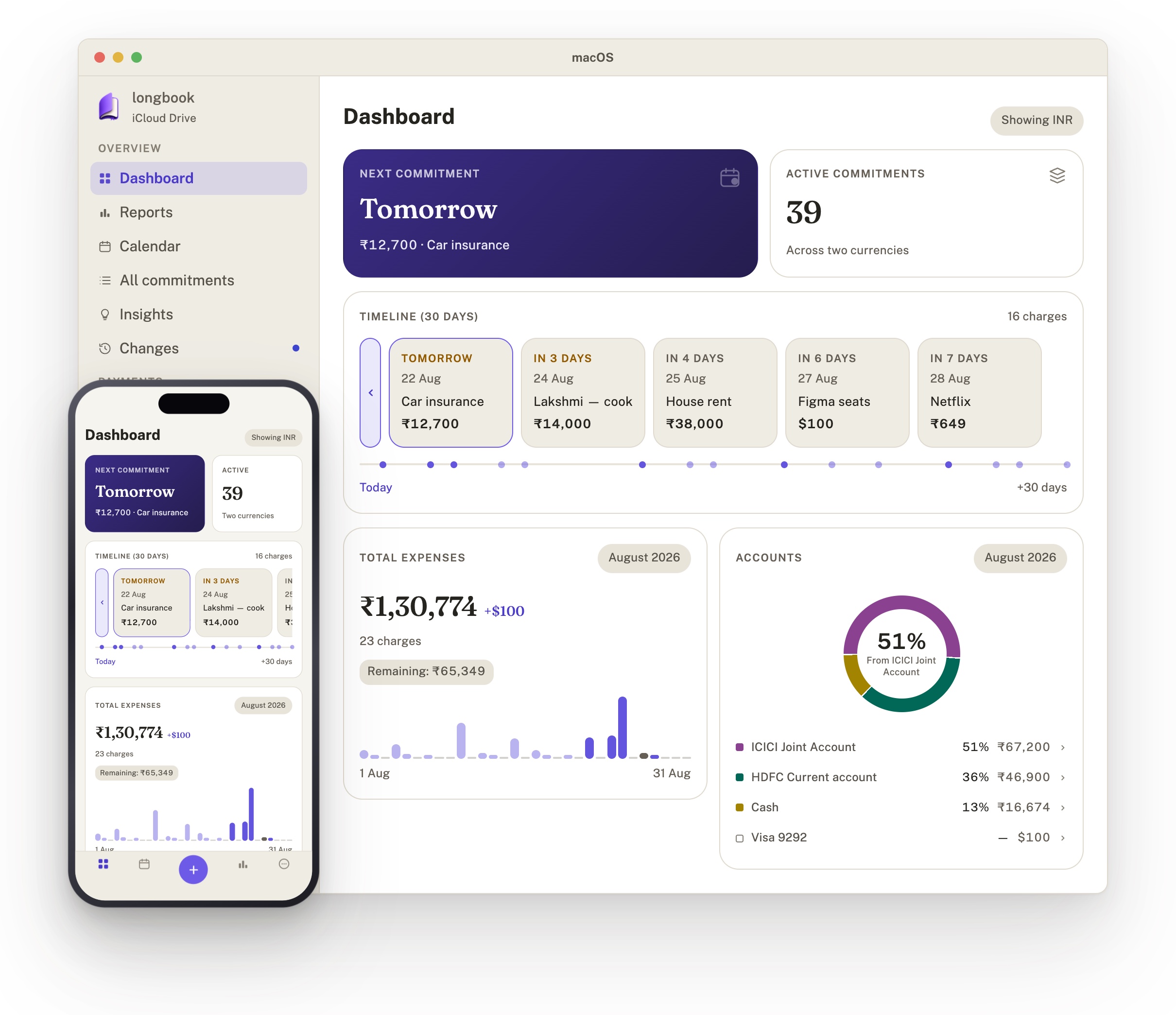
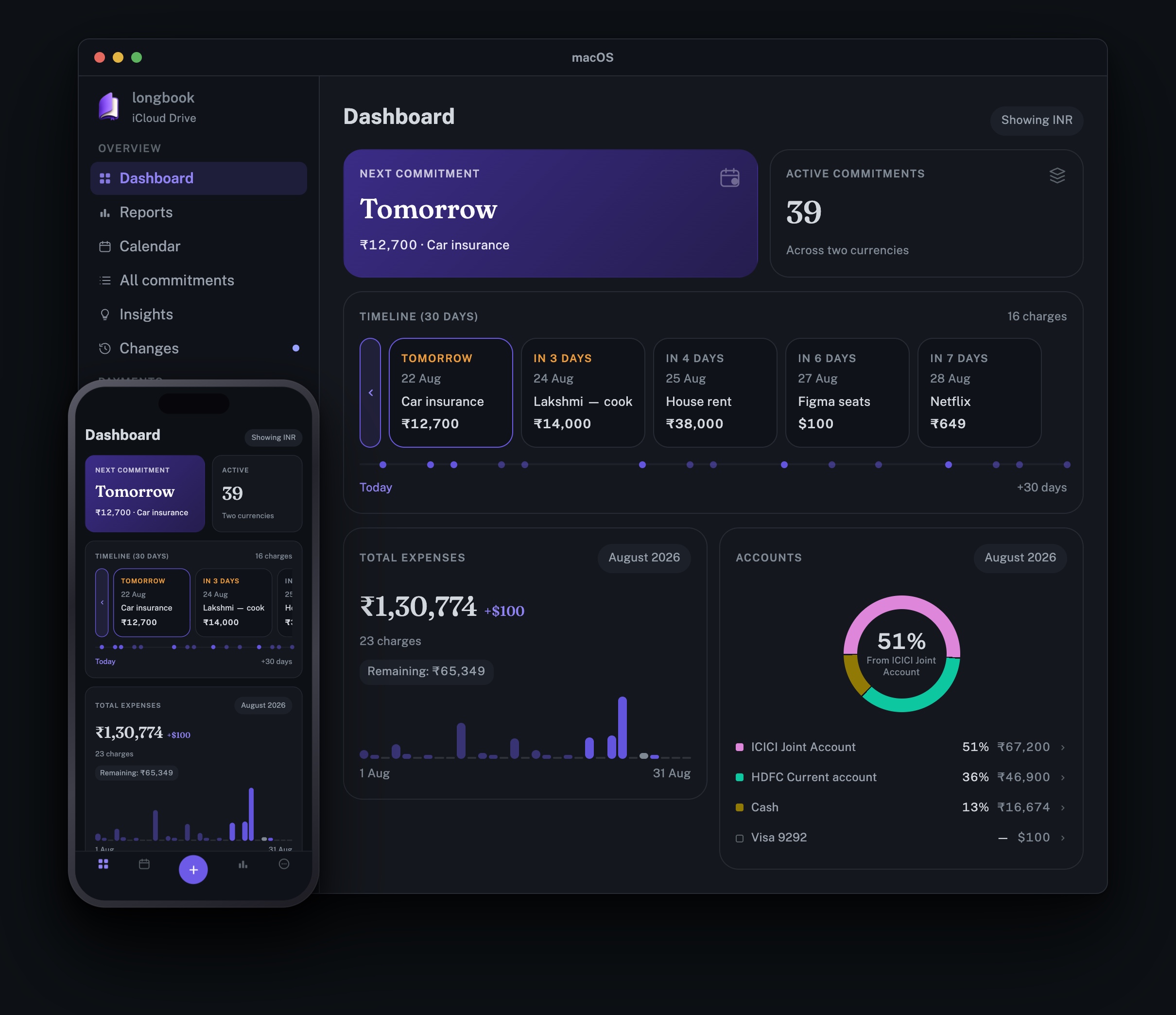




More: Media kit, The media kit in Markdown, Every file with its size and checksum
Listings and badges
- FollowX
- Dodo Payments Index
- Wellknown
- Indie Hackers
- Official MCP registry
app.longbook/mcp
More: Reviews