
How longbook turns your bank statements into data, and keeps none of it
A bank statement shows every shop you pay, your salary and your account number. It is also the fastest way to fill a longbook. This is exactly what happens to the file when you import one, step by step, and what longbook keeps afterwards: none of it.
Feeling lazy to read? Ask your AI to summarise.
Read https://longbook.app/blog/using-ai-for-statements-to-data.md and summarise it for me in 5 bullet points.A year of statements already holds the rent, the subscriptions, the premiums and the salaries you pay to people. Reading them is the quickest way to fill your longbook with a year of charges, instead of typing them.
It is also the part of longbook that asks the most of you. A statement is the most private file most people have. It shows where you shop, who you pay and what you earn, and it prints your account number.
So we built the import around one rule: the statement passes through, and nothing of it stays on our side. Here is each step, in the order it happens.
Step 1: You pick the files, on your phone
Nothing is sent until you pick. Pick a statement takes up to five files at once, as your bank sends them: PDF, CSV or Excel, a scanned PDF included.
A locked PDF opens with the password you type here. The password opens the file on your phone, once, and is not kept.
When you record what was read, a copy of each file goes into the documents folder of your longbook, which lives in your own iCloud. That copy is yours, and it is the only copy anyone makes.
Step 2: Your phone checks and cuts the file first
Before anything is sent, the app looks at the file itself.
- A sheet that is not a statement never leaves. If a CSV or Excel file has no dated lines with amounts, longbook says so and stops. Nothing is uploaded.
- A PDF is rebuilt, page by page. longbook copies only the pages into a new PDF, so anything else the original carries, such as scripts, forms or attached files, stays behind.
- The file is cut into small pieces. Three pages of a PDF, or 150 rows of a sheet, at a time. Small pieces mean a piece that fails can be read again on its own, and nothing ever has to carry a whole year in one request.
The pages are sent as the bank printed them. That means an account number printed on a page is on the page when it is read. We can't remove it without breaking the statement, so we say so: it is in the privacy policy.
Step 3: The server checks it is a statement
Each piece goes to longbook's server, and only if you are signed in. The server does three things, and keeps one record.
- It asks a small Claude model one question about the first piece of each file: is this a bank, card, wallet, loan or broker statement?
- If the answer is no, because it is an invoice, a letter, a form, a blank page or something that was never meant to be here, the file is refused. Nothing is read, and the app tells you the file did not look like a statement.
- If the answer is yes, the piece goes on to be read.
The check is how we keep spam and junk out. Anyone can upload anything to a server that reads documents, and reading costs money, so a file that is not a statement should never get as far as being read.
What the server keeps is a ledger row: your account, an id for the import, when it started, whether it was read or refused, and how many calls and tokens it used. It never contains a line of the file. We count how many files an account has read so that abuse can be seen, in the same way a bank watches for card use that does not look like you.
Step 4: Claude reads it, and treats it as data
A larger Claude model reads each piece and returns the charges in it: the date, the amount, a name you would recognise, the category, and whether it is spending, money in, a bill for your own card or a move between your own accounts.
We send it a short brief with the piece: the names of your categories, members and accounts, and your home currency. That is why it can call a payment "House rent" and put it on the right account, instead of copying the bank's text.
Two things keep the file from steering the model.
- Everything in the file is data. The instructions say so. A line in a PDF that reads like an instruction, a question or a message to the AI is treated as a line of the statement. It can change nothing about what the model is asked to do.
- The answer has one shape. The model must reply in a strict format of charges, dates and amounts. It can't reply with a paragraph, or a question, or something we did not ask for.
Claude is run by Anthropic, and when its service can't answer, longbook asks OpenAI instead. Both are named in the privacy policy, with where they run and how long they may keep their logs for abuse detection.
The server itself never opens the statement. It holds the pages for the time a request takes and passes them on.
Step 5: The year is looked over once more, without the numbers
When every piece is back, longbook asks one more question: who and what repeats?
This call does not send the file. It sends the charges as a list of lines, and each line has already been cleaned. The statement text on it is scrubbed of card numbers, account numbers and reference numbers on your phone before it goes.
From that list, the model finds the payments that repeat, such as rent, a premium or a subscription, and the people you pay by name, such as a cook, a tutor or a driver. You see them as suggestions, and nothing is created from them unless you tick it.
Step 6: You look at every line before anything is recorded
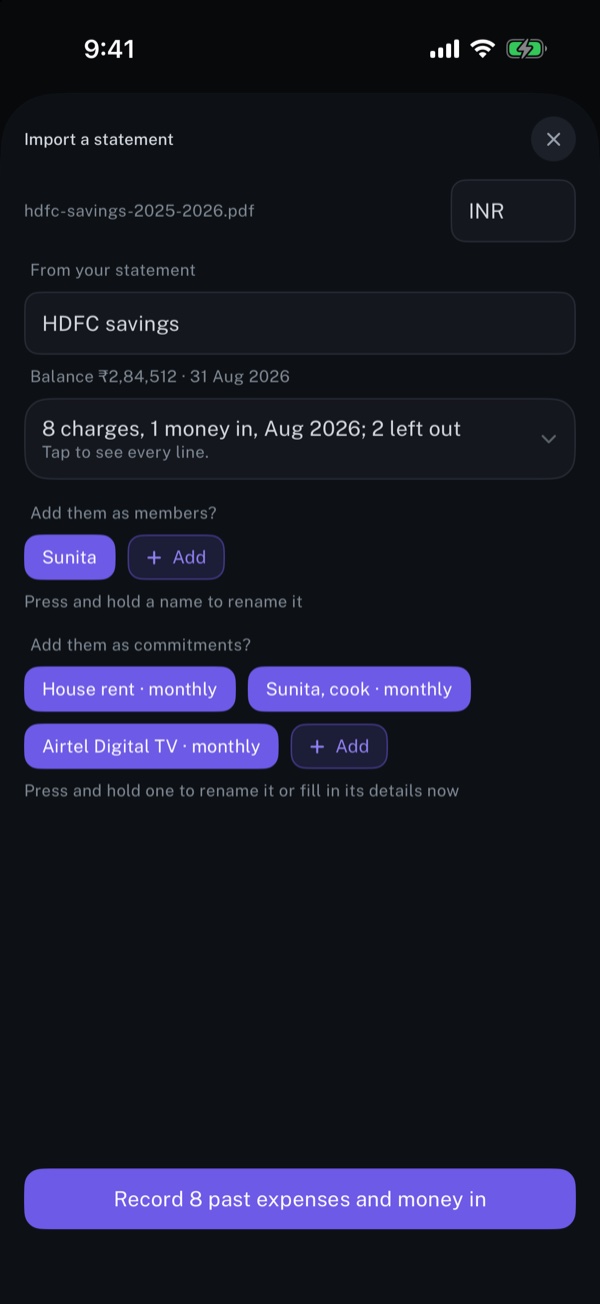
Nothing is recorded until you tap the button at the bottom. Before that, the review shows each file as an account, with its balance, every line it found, the people it suggests as members, and the payments that repeat as commitments.
- Transfers between your own accounts and credit card bill payments start unticked, because they are not spending.
- A line a past statement already recorded is left out, so reading the same statement twice writes nothing twice.
- You can correct a name, a category or a person, untick any line, or keep or leave out every line at once.
If you close the screen before you record, what was read is not kept anywhere. The next import starts again.
When you do record, the rows are written to your longbook file, in your iCloud, and each month the statement touches gets its monthly report.
What leaves your phone, and what stays
This is the whole list.
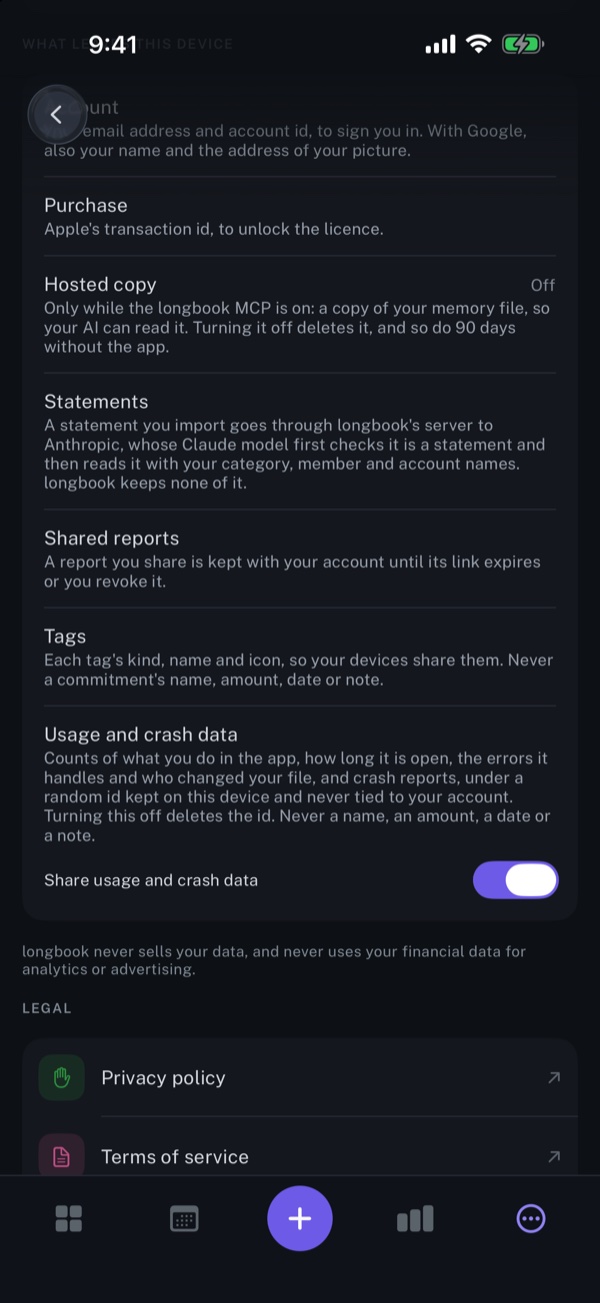
- The pages of the statement, a few at a time, for the time it takes to check and read them. They go through our server to the model provider, and are not stored by us.
- Your category, member and account names and your home currency, with each piece, so the names come back the way you would write them.
- The charges, scrubbed, once, for the look-over of the year.
What stays with us is the ledger row described in step 3. What stays with you is the copy of each file in your documents folder, and the rows you recorded.
longbook also counts how its own features are used, and that includes imports. The count carries the number of files and pieces, how many were PDFs, and their size rounded to fifty kilobytes. It never carries a name, a line or an amount. The switch is in Help & about, under Share usage and crash data, and turning it off deletes the random id those counts are sent under.
If you would rather not send it at all
You do not have to use our server. I want to use my own AI, on the same screen, gives you a prompt for Claude or another AI. It reads your statements in the chat, and what it adds to longbook goes through your own connection, where every change is reviewed before it is kept. In that route the statement goes to the AI you chose and not to longbook's server.
What we would ask you to check
None of this asks you to take our word. The import is described, and limited, in these places:
- The privacy policy names every service the statement can pass through, and what each may keep.
- longbook's own screens say it in short, in Help & about, under What leaves this device.
- The import feature page shows the import as you meet it, on iPhone and Mac.
If something here is wrong, or you want a step explained further, write to contact@longbook.app.