
How to show reviews about your product to the world
Someone writes a kind reply about your app, and by tomorrow it has scrolled out of sight. This is how we keep every review of longbook on one page, step by step, what that page does for a small developer's search ranking, and why a page you write yourself does more than a wall of embedded posts.
Feeling lazy to read? Ask your AI to summarise.
Read https://longbook.app/blog/how-to-show-reviews-about-your-product-to-the-world.md and summarise it for me in 5 bullet points.The first reviews of a new app are scattered. A reply on X, a comment under a Reddit post, a message from a friend of a friend. Each one is the most convincing thing anyone will read about your app, because you did not write it. Each one is also gone from view within a day.
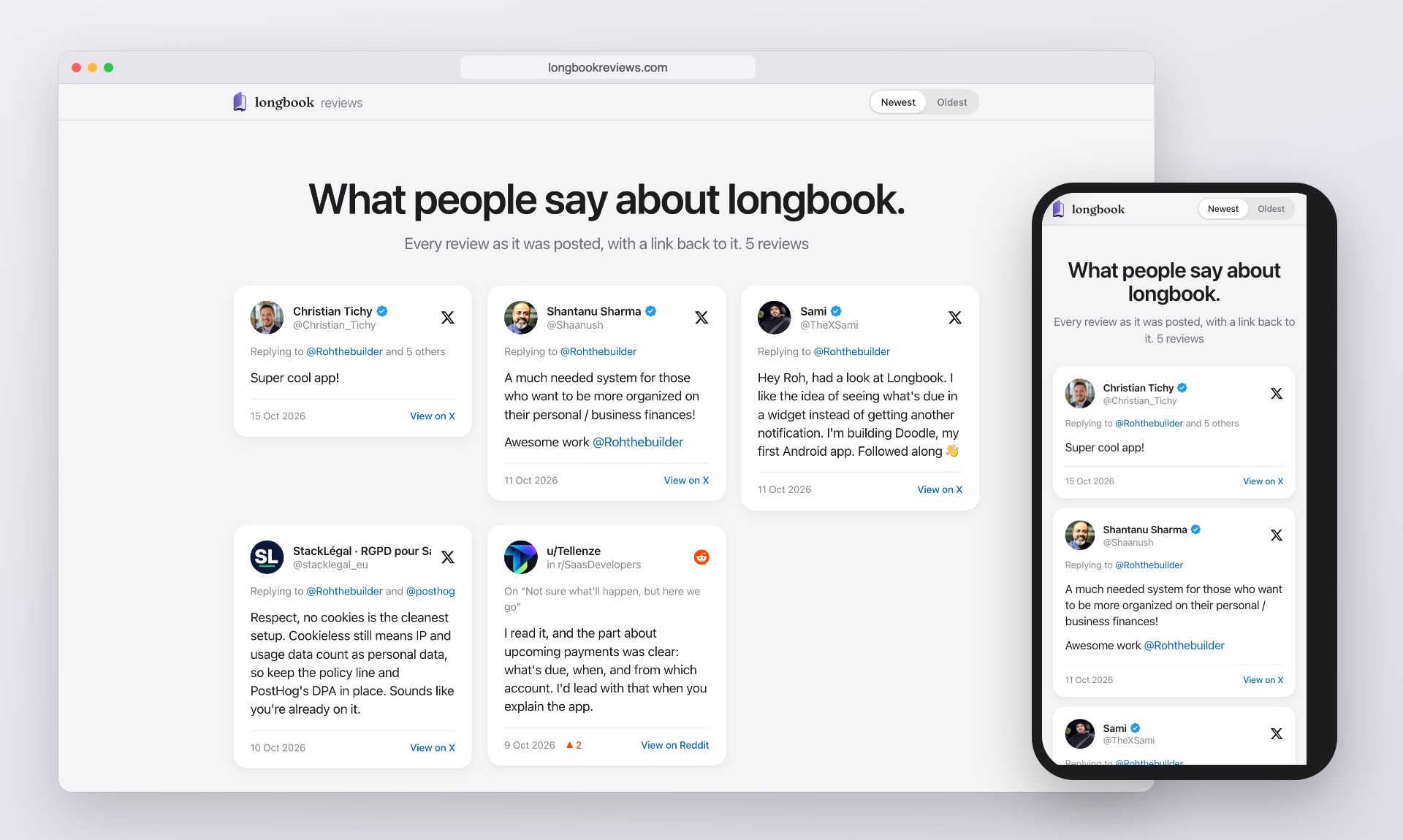
So we put them in one place: one page of what people have said about longbook, each review linked to the post it came from. It is at longbook.app/reviews and at longbookreviews.com. This post is how we built it and how we keep it current, in the order we would do it again, so you can do the same for your own product.
Step 1: Keep every review the moment you see it
Reviews arrive when you are busy with something else. If saving one takes more than a few seconds, you will not do it, and a month later you will not find it again.
We keep one inbox for them. When someone says something about longbook, we drop the post's link into it, with a screenshot if the post has a picture. The inbox is a private page in Claude, and the review waits there until it is on the site.
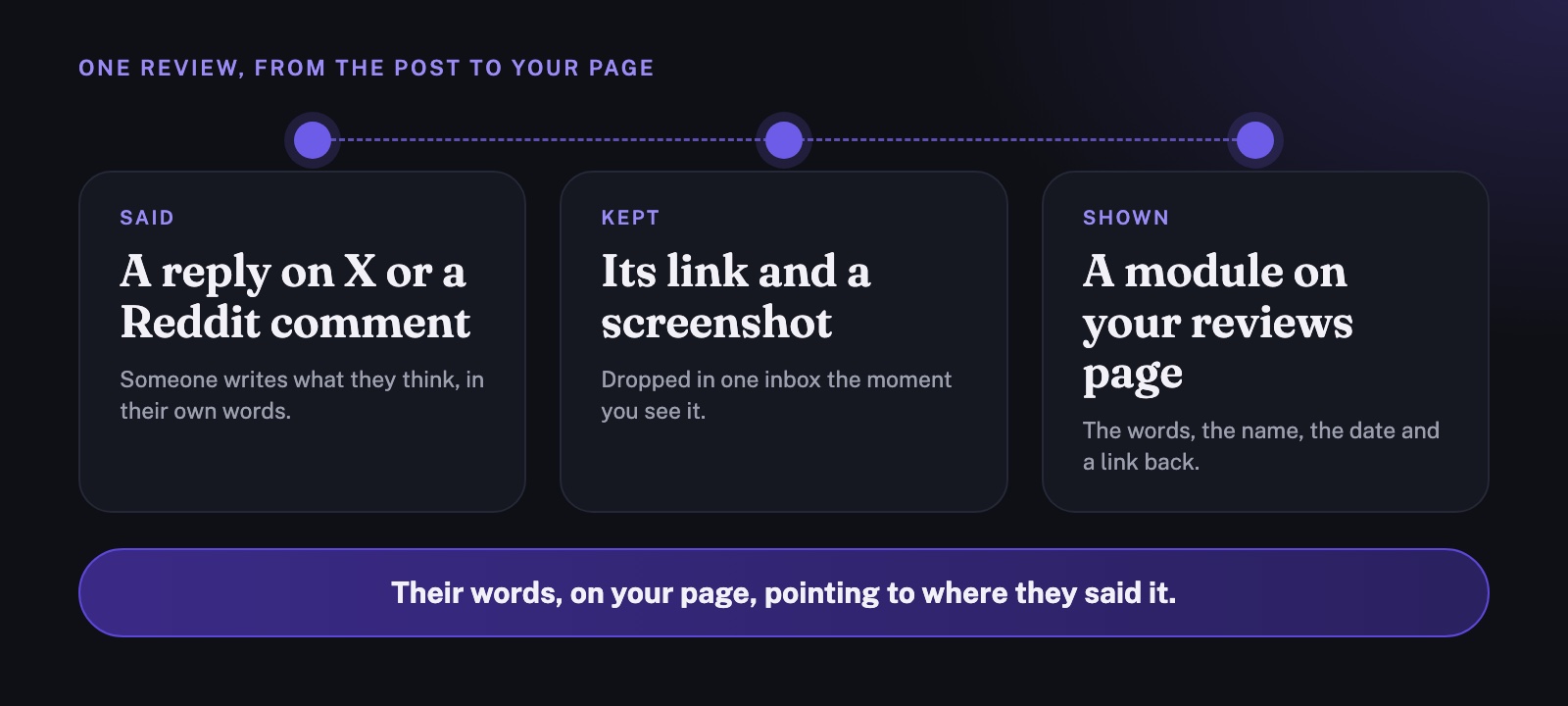
When we say “update the site with new reviews”, Claude reads everything waiting and does the rest:
- The words, exactly as posted. Nothing is shortened or corrected, typos included.
- The date and time the post went up, from the post itself.
- The person's name, handle and picture, as their profile shows them.
- The link to the original post.
Then the review is marked as on the site, with a link to its own place on the page.
Step 2: Write each review into your own page
There are two ways to put a post from X on your website. You can paste X's embed code, or you can write the review into your page yourself. They look alike, but they behave differently.
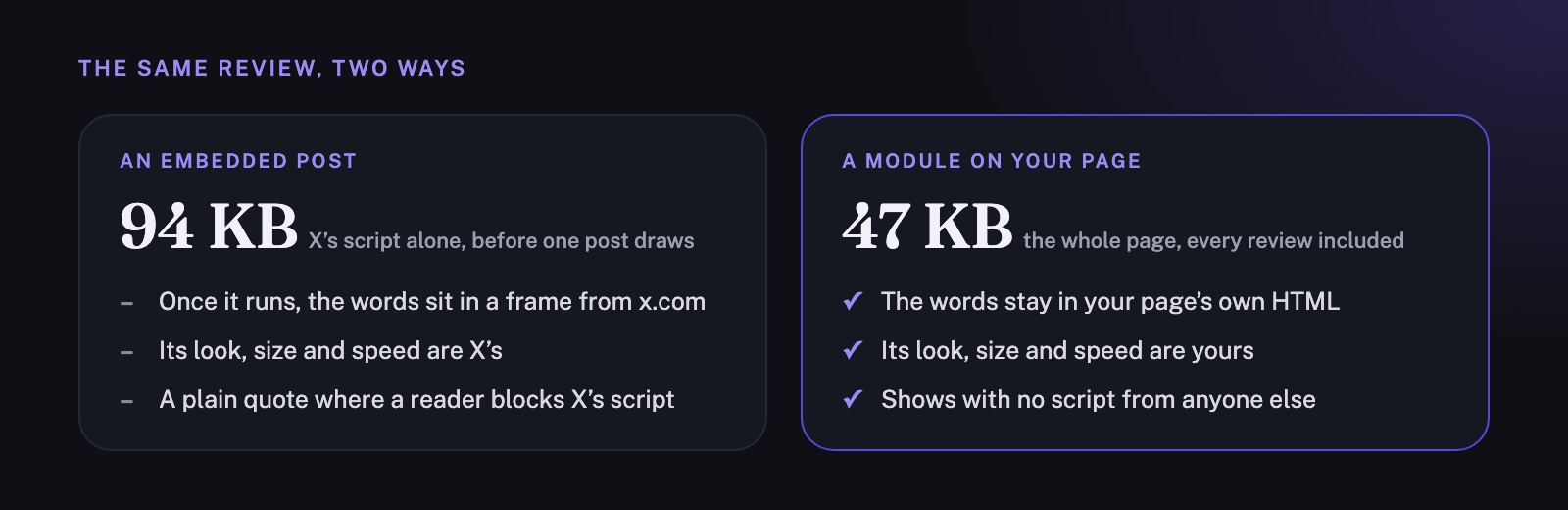
The embed code puts the post's text in your page as a plain quote. Then X's script loads, 94 KB of it before a single post is drawn, and replaces the quote with a frame served by x.com. From then on, the review is X's: its look, its size and how fast it loads. Where a reader blocks X's script, they see the plain quote.
A module you write yourself keeps the words in your page's own HTML. Our whole page, every review and all its code included, is 47 KB, half the size of X's script alone, and it loads no script from anyone else. When we checked the page as a search engine first receives it, before any script runs, it held 504 words, and every review was among them.
Each module carries what the original showed: the picture, the name and handle, who the post was replying to, the words, the date and a link that says where it goes, View on X or View on Reddit. The whole module is the link, so a reader can check any review in one tap. That link is what makes the page believable. Anyone can type kind words onto their own website. Not everyone lets the reader check them.
Step 3: Make the page easy to read for search engines and AIs
A page of reviews answers the search people make just before they install something: the name of your app followed by “reviews”. For a new app, nothing else answers it yet. Give that search a good page to land on.
What we put on longbookreviews.com, and what you can copy:
- A title and description that say what the page is. Ours is “longbook reviews: what people say about longbook”, with a description that counts the reviews and names where they came from.
- Every review in the HTML the server sends, as in step 2. Search engines that run scripts and the many AI crawlers that do not both read the same words.
- Structured data (schema.org, as JSON-LD) that names longbook as the app being reviewed and lists each review with its author, the date it was posted, its text and the address of the original. The questions in the footer are marked up as questions and answers.
- A share picture at 1200 × 630 pixels, so a link to the page shows the logo, the heading and the people's faces when it is posted on X, Reddit or in a message.
- A Markdown copy of the page at longbookreviews.com/reviews.md, and a sitemap that lists both.
- The official logo and app icon from our media kit, so the page, the browser tab and the share picture all look like longbook.
- A real “not found” page. An address that does not exist answers with a 404, so search engines never index a wrong address as a copy of the page.
What we left out matters too. These posts carry no star ratings, so the structured data has none, and search results will show no stars beside the page. Adding a rating nobody gave would be inventing a review. The words are what persuade.
Step 4: Know what the page does for your search ranking
A reviews page helps a small app be found in three ways. It is worth knowing which three, because the obvious guess is wrong.
- It answers the search for your app's reviews. People type the name of an app followed by “reviews” just before they install it. For a new app, nothing else answers that search yet, so your page can be the first result.
- It gives other websites a reason to link to you. A writer comparing finance apps, a newsletter or a list of tools would rather link to a page of real reviews than to a sales page. A link from someone else's website is what search engines count as a vote for yours, and those votes are what raise a site's standing over time.
- It turns a visit into an install. A reader who has just found your app wants to know whether real people use it. A page of their words, each one checkable, answers that better than anything you could write.
The obvious guess is that the links on the page help too. They mostly do not. Your own posts on X and Reddit carry links that both sites mark as “nofollow”, which search engines treat as a mention, not a vote. The links from the reviews page out to X and Reddit add nothing to the page's own standing, because what counts is the links that come in. And a link between two websites you own counts for very little, because search engines can tell both are yours. Building more of your own sites to link to each other is a pattern they discount.
So the work after the page is live is to get it read and linked: put the address in your profile, share it when someone asks what people think, and send it to anyone writing about apps like yours.
Step 5: Decide where the page lives
You can put the page at an address on your own website, such as /reviews, or on a domain of its own.
- On your own website, every link someone gives the page adds to the standing of your whole site, and your other pages can link to it at once. For most small developers, this is the place to start.
- On its own domain, the page reads as a wall of what other people said, separate from the pages where you sell. It starts with no standing of its own, so it needs links of its own.
We do both. The reviews are at longbook.app/reviews, in the same design as the rest of longbook.app, and at longbookreviews.com, a plain page of its own. Both are built from the same list, so a new review appears on both, and every question in the footer of longbookreviews.com links back to the page on longbook.app that answers it in full.

Step 6: Respect the people you quote
Every review on the page is a public post, quoted as it was written, with the person's name and a link to the original. Their words belong to them, and the page says so.
- Never edit a review. If it has a typo, it keeps the typo.
- Show the date, so nobody mistakes a review from last year for one from last week.
- Take a review down when its author asks. We do.
What we would ask you to check
You do not have to take our word for any of this:
- The reviews are at longbook.app/reviews and longbookreviews.com. Open any review, and it takes you to the post it came from.
- View the page's source in your browser, and every review is there before any script runs.
- The same reviews as text are at longbookreviews.com/reviews.md.
If you have written about longbook, on X, Reddit or anywhere else, and want it on the page, or want it taken off, write to contact@longbook.app.